

Net payment terms let a business customer receive an order now and pay the invoice a set number of days later. Net 30 means the full amount is due 30 calendar days after the invoice date, and 2/10 net 30 takes 2% off if the buyer pays within 10 days. They're a form of trade credit, so approve each buyer and set a credit limit before you offer them.
Quick summary
- What they are: a set number of calendar days to pay an invoice, such as Net 15, Net 30 or Net 60. Net 30 is the most common.
- When the clock starts: usually the invoice date. Some sellers count from the order or delivery date, so print your start date on every invoice.
- Early-payment discounts: 2/10 net 30 works out at about 36.7% a year, so it's an expensive way to get paid sooner.
- Who gets terms: buyers who pass a credit check, starting on a short term with a low credit limit.
- Late payment: agree fees and credit holds in writing before the first order. In the UK, the law already gives you statutory interest on late business payments.
What are net payment terms?
Net payment terms give a business buyer a set number of calendar days to pay an invoice, with weekends and holidays included. You ship the goods now and wait for the money, which makes net terms a form of trade credit.
Net terms usually count from the invoice date. The U.S. Chamber of Commerce defines Net 30 as settling the account within 30 days of the date on the invoice, and calls it the default option used by most businesses.
| Term | Payment is due | When to use it |
|---|---|---|
| Net 15 | 15 days after the invoice date | New buyers, small orders, or goods that need fast cash turnover |
| Net 30 | 30 days after the invoice date | The usual default in wholesale and distribution |
| Net 45 | 45 days after the invoice date | Larger orders and buyers you've traded with for a while |
| Net 60 | 60 days after the invoice date | Large buyers who negotiate longer terms, such as chains and corporates |
| Net 90 | 90 days after the invoice date | Enterprise and public-sector buyers. Hard for a small seller to carry |
| Due on fulfilment | Once every item in the order has shipped | When you want payment to follow dispatch, not a fixed day count |
How net terms work in a B2B store, step by step
Net terms run in six steps. The first two happen before a buyer's first order, the next three repeat on every order, and the last is a regular review of the account.
- Write your terms. Pick a term from the table, such as Net 30, and put it on your credit application and every invoice, with any discount and late fee.
- Approve the buyer. Check their credit application and references, then give them a term and a credit limit.
- Take the order on terms. The buyer chooses to pay on account at checkout. The order arrives unpaid, with their terms attached.
- Ship and invoice. The invoice date usually starts the clock, so show the start date and the due date on the invoice.
- Remind and collect. Send a reminder before the due date. A buyer who misses it owes the late fee you agreed.
- Review the account. Raise the limit after a few on-time payments, and put overdue accounts on a credit hold.
Worked example: a Net 30 timeline for a $5,000 order
A $5,000 order on Net 30, invoiced on 7 October, is due on 6 November. Here's how it plays out for a buyer who orders on 6 October.
| Day | Date | What happens |
|---|---|---|
| Order day | 6 October | The buyer checks out and pays on account. The order arrives unpaid, with Net 30 attached. |
| Day 0 | 7 October | You ship and send the invoice, showing the 6 November due date. You now hold a $5,000 receivable. |
| Day 23 | 30 October | You send a reminder, a week before the due date. |
| Day 30 | 6 November | The full $5,000 is due. |
| Day 31 | 7 November | The invoice is overdue, and any late fee you agreed applies. |
Count from the order date instead and the same order falls due on 5 November. Count from delivery and it moves later by the transit time. Whichever you choose, place a test order and check the invoice shows the right due date.
How 2/10 net 30 works, with the maths
2/10 net 30 takes 2% off if the buyer pays within 10 days of the invoice date. Otherwise the full amount is due on day 30.
On the $5,000 order above, a buyer who pays by 17 October sends $4,900. You give up $100 and get your money 20 days sooner.
That $100 is 2.04% of the $4,900 you receive, for 20 days' use of the money. A 360-day year holds 18 of those 20-day periods, so the annual cost is 2.04% × 18 = 36.7%. AccountingTools gets the same 36.72% from the formula: discount ÷ (1 − discount) × 360 ÷ (days to pay − discount days).
So the discount only pays off if getting cash 20 days early is worth more than 36.7% a year to you. If you can borrow for less, it's cheaper to borrow. Check it against your margin too: on a $5,000 order with $1,000 profit, the $100 discount is a tenth of your profit.
Pros and cons of offering net terms
Net terms win and keep trade customers, but they slow your cash and add risk. Until the due date, every invoice is an interest-free loan to your buyer.
✓Pros
- More buyers say yes. Many businesses can't pay upfront, or need an invoice before they can release funds.
- Bigger orders. Buyers aren't limited by the cash in their account on the day.
- It's expected. Net 30 is the norm in wholesale, so not offering terms can lose you accounts.
✕Cons
- Slower cash. On Net 30, a $5,000 order ties up $5,000 for a month. Plan as if every buyer pays on the last day.
- Late payment. Some buyers pay after the due date, and chasing them takes time.
- Bad debt. If 2% of the $200,000 you invoice on terms each year goes unpaid, that's $4,000 lost.
Payments company Balance reports that offering pay by invoice on net terms increases new buyer acquisition by 38%, and that 40% of buyers spend more each month once they have trade credit. It's a vendor's own data and doesn't explain how it was measured, so treat it as a direction rather than a promise.
Before you offer terms, decide the most your business can be owed at once without missing a supplier bill or payroll. That number caps your credit limits.
How to decide who gets net terms
Give terms only to buyers who pass a credit check. Start with a short credit application that covers:
- Identity: the legal business name and a company number or tax ID
- Time trading: how long the business has been running
- Bank reference: the bank and a contact who can confirm the account
- Trade references: at least two suppliers who can say whether the buyer pays on time
- Permission: signed consent for you to run the checks
Then pull a business credit report from a bureau such as Dun & Bradstreet or Experian. If it shows judgments or collections, offer card payment or a deposit instead. Call the references and ask how many days the buyer takes to pay, and whether that has slowed.
Next, set a credit limit: the most one buyer can owe you at any time. A buyer with a $10,000 limit who owes $8,000 can place $2,000 more on terms until they pay some of it off.
Start new accounts small, with a low limit and a short term such as Net 15, and raise both after a few on-time payments. Keep Net 60 and Net 90 for large buyers who negotiate them: a $5,000 order on Net 60 ties up your cash twice as long as on Net 30.
That's how Paleo Ridge runs it, selling to everyone from independent shops to supermarket chains. Its payment terms are set per customer group: newer customers pay upfront, while loyal buyers can pay on net terms.
"We have a diverse range of customers, so we had to consider a lot of things - such as payment terms, different levels of margin - all things that are simple in isolation but can become complex when they're added together. But it didn't feel like that with SparkLayer - it was painless and very clear."
Will Green, Director of Sales and Marketing, Paleo RidgeLate fees, credit holds and collections
Penalties only work if the buyer agreed to them before the sale. Put any late fee in your written terms and on every invoice, and say when it starts, whether there's a grace period and whether it repeats each month.
- A flat fee is a set amount, such as $25 on a $1,000 invoice.
- A percentage fee follows the invoice, so 5% of $1,000 is $50.
What you can charge depends on where you trade:
- In the UK, the Late Payment of Commercial Debts rules let you claim statutory interest of 8% plus the Bank of England base rate on late business payments, unless your contract sets a different rate. Agreed payment periods between businesses should usually be no more than 60 days.
- In the US, late fees follow state law, and some states cap them. Check the limit that applies, or ask a lawyer to review your terms.
A credit hold stops a buyer who is overdue, or who would go over their limit, from ordering on terms until they pay. Add the hold rule to your written terms too.
If an invoice stays unpaid, escalate in steps:
- Before the due date. Send a reminder.
- On the due date. Send another reminder.
- Once it's late. Call the buyer's accounts payable contact and put the account on credit hold.
- When that fails. Consider a collection agency.
According to the U.S. Chamber of Commerce, agencies typically step in once an invoice is 90 days past due, and take a contingency fee of often 25% to 50% of what they recover.
Net terms on Shopify: native B2B vs SparkLayer
Shopify's native B2B features are now on every Shopify plan, and they include payment terms. SparkLayer adds credit limits, balances and invoicing around them.
| Shopify native B2B | With SparkLayer | |
|---|---|---|
| Terms available | Net 7, 15, 30, 45, 60 or 90, or due on fulfilment. A fixed date on draft orders | Net 7, 15, 30, 45, 60 or 90 |
| Where you set them | On a company, a company location, or in bulk | On a company or one of its locations, or on a customer's record |
| Credit limits | Not part of Shopify's payment terms settings | A limit and a balance per company or customer. By default, pay on account turns off for an order over the limit |
| What the buyer sees | Pay now on each order, and an Overdue label once terms expire | Their payment terms, credit limit and balance in My Account |
| Invoices | From Shopify or an invoicing app | Automatic PDF invoices with SparkLayer Invoices (Growth plan and up) |
| Accounting | Through your accounting app | Xero and QuickBooks integrations (Pro plan and up) |
Shopify details are from its payment terms help page, and SparkLayer's from our pricing and help centre, checked on 19 November 2026.
Two native details to know: terms start from the day the order is placed, and payment isn't captured automatically when terms expire, so you collect each one yourself. Deposits on payment terms need Shopify Plus.
With SparkLayer, pay on account, credit limits, balances and net terms are on every plan, including the free Basic plan, and SparkLayer charges no transaction fees on orders. SparkLayer Invoices creates the invoice for each order, which buyers download from My Account (see how it compares with other B2B invoicing software), and the Pro plan connects orders with invoicing and payment data in Xero and QuickBooks.
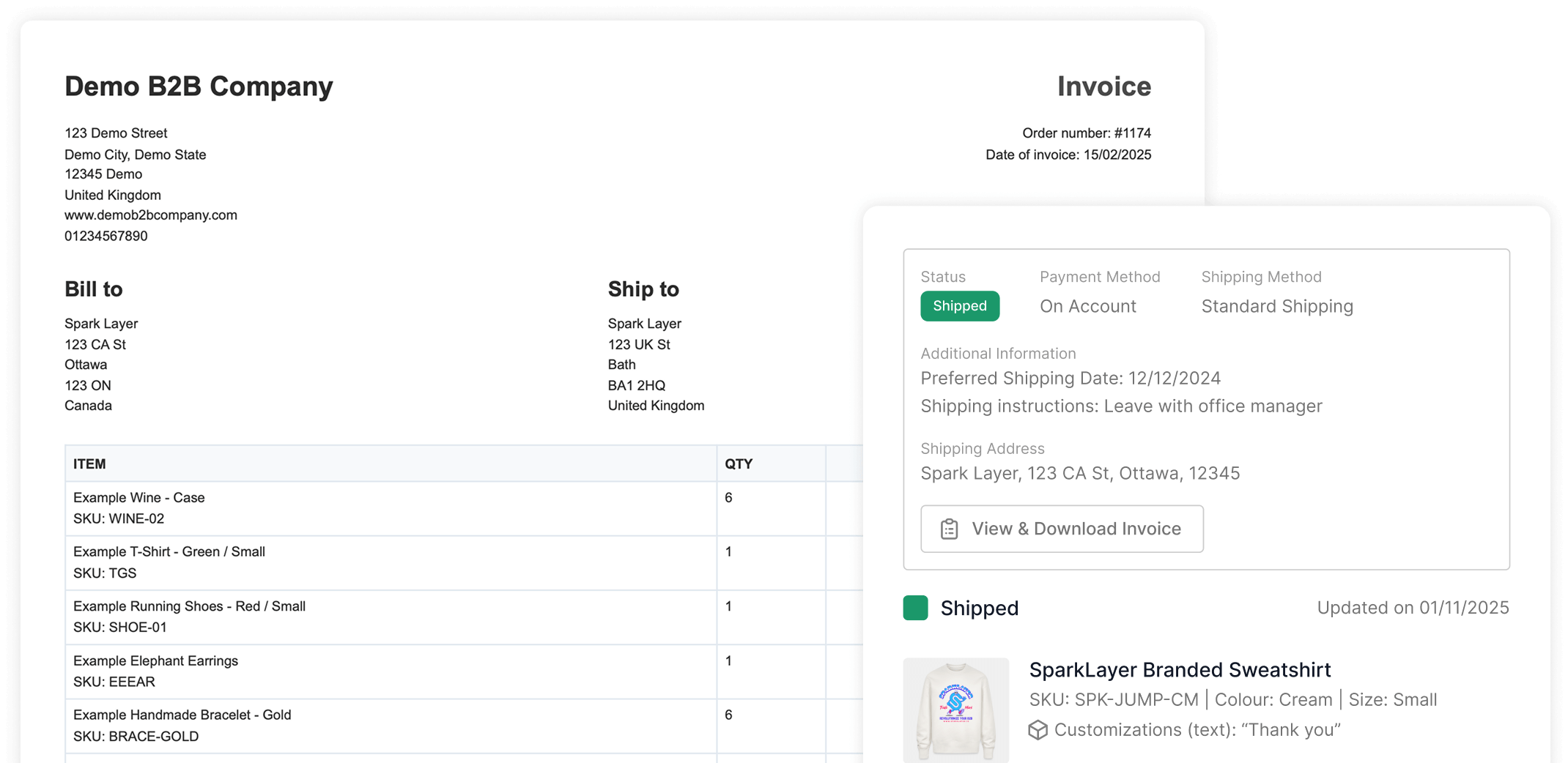
Set up net terms in SparkLayer
- Turn on pay on account. In the SparkLayer Dashboard, open Companies › Customer groups, open the group and tick Payment on account in its payment methods. Keep card payment ticked if they can also pay by card.
- Set each company's limit and terms. On Shopify, open the company, turn on Let them pay later and enter the credit limit, currency and net terms. A location can set its own terms if it needs to.
- Choose how you'll invoice. SparkLayer Invoices on Growth and up, or invoices from your store or an app.
- Place a test order. It should arrive unpaid with the buyer's terms attached, and their balance should go up.
The help centre's guide to letting trusted customers pay later on Net 30 covers every option, including setting terms on individual customers and on other platforms.
Brands running wholesale on terms with SparkLayer:
 24 hoursto go live, with net terms for loyal buyers and upfront payment for new onesRead the story
 900%+monthly B2B revenue growth, with manual tasks cut by 75%Read the story
 3+ yearsrunning B2B on SparkLayer, with account balances and custom net termsRead the story
 +73%average order value, selling wholesale in several currenciesRead the story
Frequently asked questions
Is Net 30 business days or calendar days?
Calendar days. Weekends and holidays count towards the 30, unless your contract says business days. If the due date falls on a weekend or holiday, say on your terms whether payment is still due that day or moves to the next working day.
When do the 30 days in Net 30 start?
Usually from the invoice date. Some sellers count from the order date or from delivery. Shopify's native payment terms, for example, start from the day the order is placed. Print your start date and the actual due date on every invoice.
How do I write Net 30 on an invoice?
Put "Net 30" next to the due date and spell it out, for example "Payment due within 30 days of the invoice date". Add the actual due date, and show any late fee your written terms include.
What does 2/10 net 30 mean?
The buyer can take 2% off if they pay within 10 days of the invoice date. Otherwise the full amount is due in 30 days. On a $5,000 invoice, paying early saves the buyer $100, which works out at about 36.7% a year for the seller.
Is Net 30 or Net 45 better?
Start with Net 30. It's what most buyers expect and it's easier on your cash flow. Offer Net 45 to larger, trusted buyers who ask for it: on a $5,000 order it ties up your cash for 15 more days.
Can I charge interest on late B2B payments?
In the UK, yes: you can claim statutory interest of 8% plus the Bank of England base rate on late business payments, unless your contract sets a different rate. In the US it depends on your written terms and state law, and some states cap late fees.
Getting started
Net terms are one of the things trade customers expect from a wholesale supplier, alongside their own prices and quick reordering. Write your terms down, check each buyer before you extend credit, start small and let good payers earn longer terms and higher limits.
To offer net terms, credit limits and invoices on the store you already run, see how SparkLayer works or compare plans and pricing.