
Quick summary
B2B product pages work differently from retail. Trade buyers need live stock, SKU visibility, bulk ordering, and account-specific pricing. Here is what this guide covers:
- How B2B product detail pages (PDPs) differ from B2C
- The key UX elements every B2B product page needs
- The matrix view and why it matters for bulk ordering
- B2B eCommerce website best practices for wholesale brands
For more on scaling wholesale, explore our best practice guides.
Why B2B product pages need a different UX approach
As B2B eCommerce continues to grow, so does the expectation that B2B websites provide an experience comparable to B2C platforms. According to Salesforce's State of the Connected Customer report, 80% of customers say the experience a company provides matters as much as its products or services, and B2B buyers are no exception.
But what does a B2C-style experience really mean in the B2B context? Are B2B customers looking for the exact same UI and UX elements as retail shoppers, or are their needs distinct?
Through this series, we will explore how B2B and B2C experiences intersect and where they diverge, covering essential areas like product detail pages (PDP), cart and checkout, account areas, post-purchase marketing, and much more.
Along the way, we will highlight examples of B2B websites that demonstrate best practices and share actionable tips for those building or refining their own B2B eCommerce platforms.
Setting the scene
In the B2B landscape, the purchase journey is often more complex than in B2C. Business customers prioritise streamlined, self-service tools, including clear visibility of pricing and catalogues, bulk-order capabilities, and transparent stock levels.
Unlike retail shoppers, B2B customers may return regularly to reorder, often with specific requirements around quantities and budget constraints. Efficiency and clarity are crucial for these customers, as they frequently manage significant purchase volumes and depend on precise details, like SKU numbers and live inventory status, to make informed buying decisions.
Ease of use is paramount in B2B. Customers value a smooth experience that allows them to find products quickly, adjust order volumes, and finalise purchases without unnecessary steps. To this end, providing self-service features - like access to past orders, saved lists, and quick reordering - greatly enhances the user experience.
When B2B websites integrate these tools effectively, they empower buyers to make decisions efficiently and strengthen long-term customer loyalty.
The Product Detail Page (PDP)
The Product Detail Page serves as a pivotal touchpoint for both B2C and B2B customers, offering a window into the product through images, descriptions, and other critical details.
In the B2C world, the PDP is a chance to extend the brand's message, echoing the visual style and tone set on the homepage.
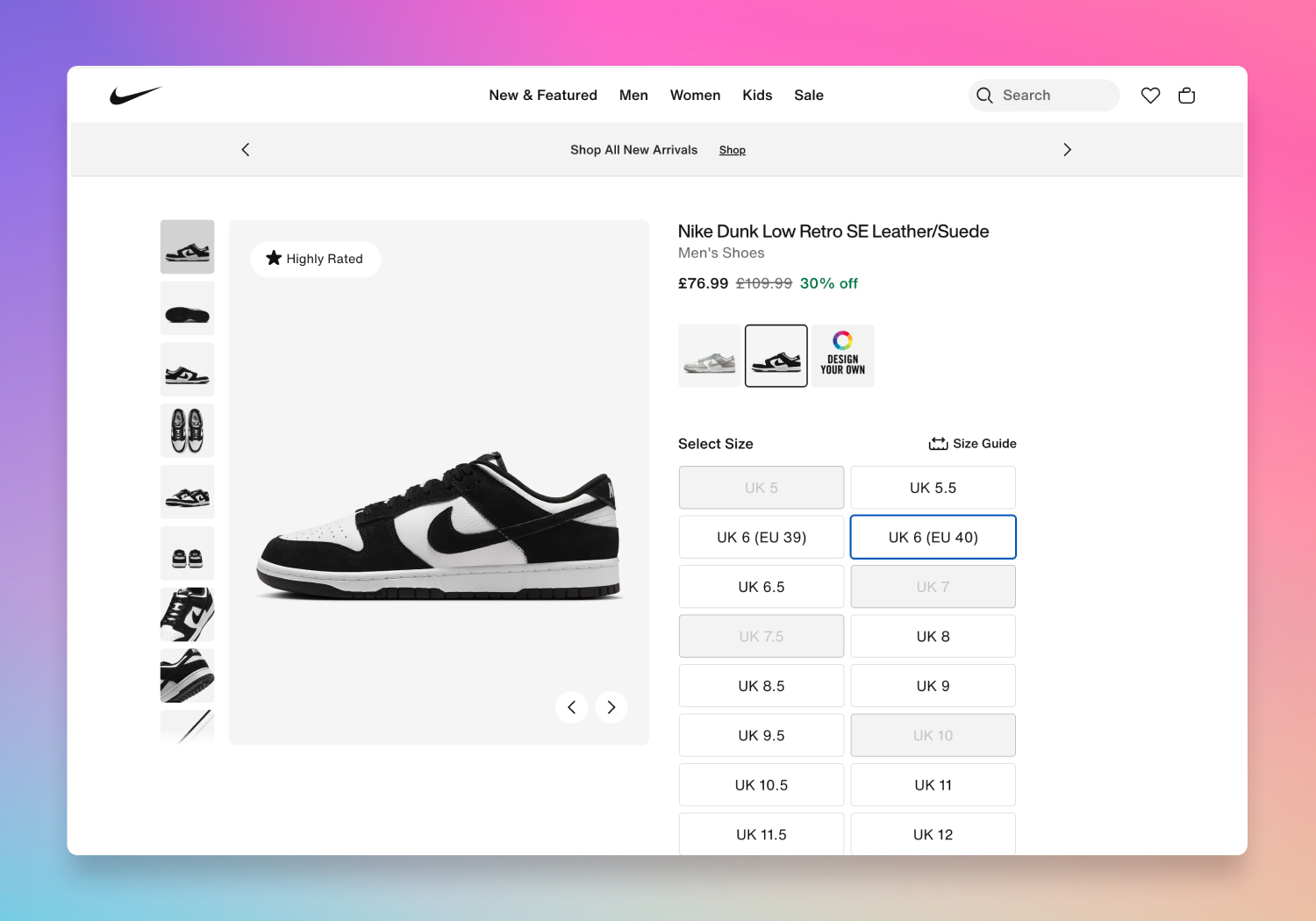 An example B2C product page on nike.com
Key elements of a typical PDP include:
- High-quality product imagery – Close-up, detailed images allow customers to evaluate the product and determine its suitability.
- Product specifications – Key details like dimensions, material descriptions, and usage information help set expectations.
- Add-to-cart and wishlist options – Simple, prominent buttons support the impulse to buy or save for later.
- Customer reviews – Feedback from other customers serves as social proof, helping to reassure potential buyers.
This structure makes it easy for customers to assess a product quickly and confidently.
The PDP for B2B
So, how does a B2B PDP differ? Let's look at examples from B2B brands like Cubitts Eyewear and Cocopup London to highlight some key differences.
On Cubitts Eyewear's B2B PDP, the brand's aesthetic continuity from B2C is preserved, with high-quality images and clear product descriptions.
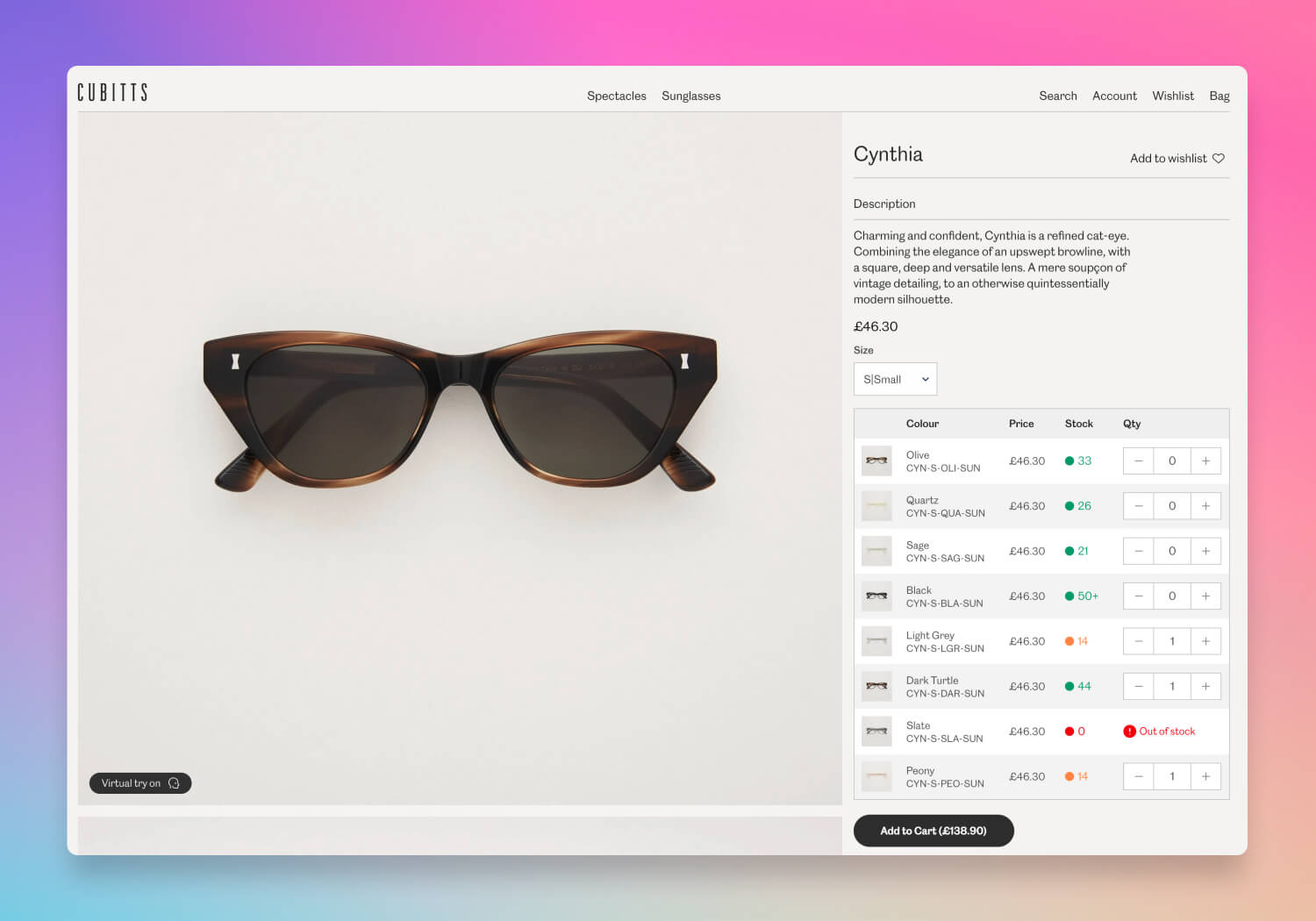 An example B2B product page on Cubitts Eyewear
But there are some notable B2B-specific details:
- Stock visibility – B2B customers need to know current stock levels to plan their orders, so the PDP includes live inventory counts.
- SKU information – Unique product codes (SKUs) are displayed prominently, as wholesale customers rely on this information to manage their own inventory.
- Recommended retail price (RRP) – Displaying RRP helps B2B buyers understand the intended retail price, aiding in pricing decisions for their own customers.
- Bulk ordering options – With the option to select quantities in bulk, B2B customers can add large volumes to the cart more efficiently.
Cocopup London's wholesale PDP is simple yet strategic. Alongside a price and quantity selector, it displays the RRP, giving wholesale buyers easy access to key pricing information.
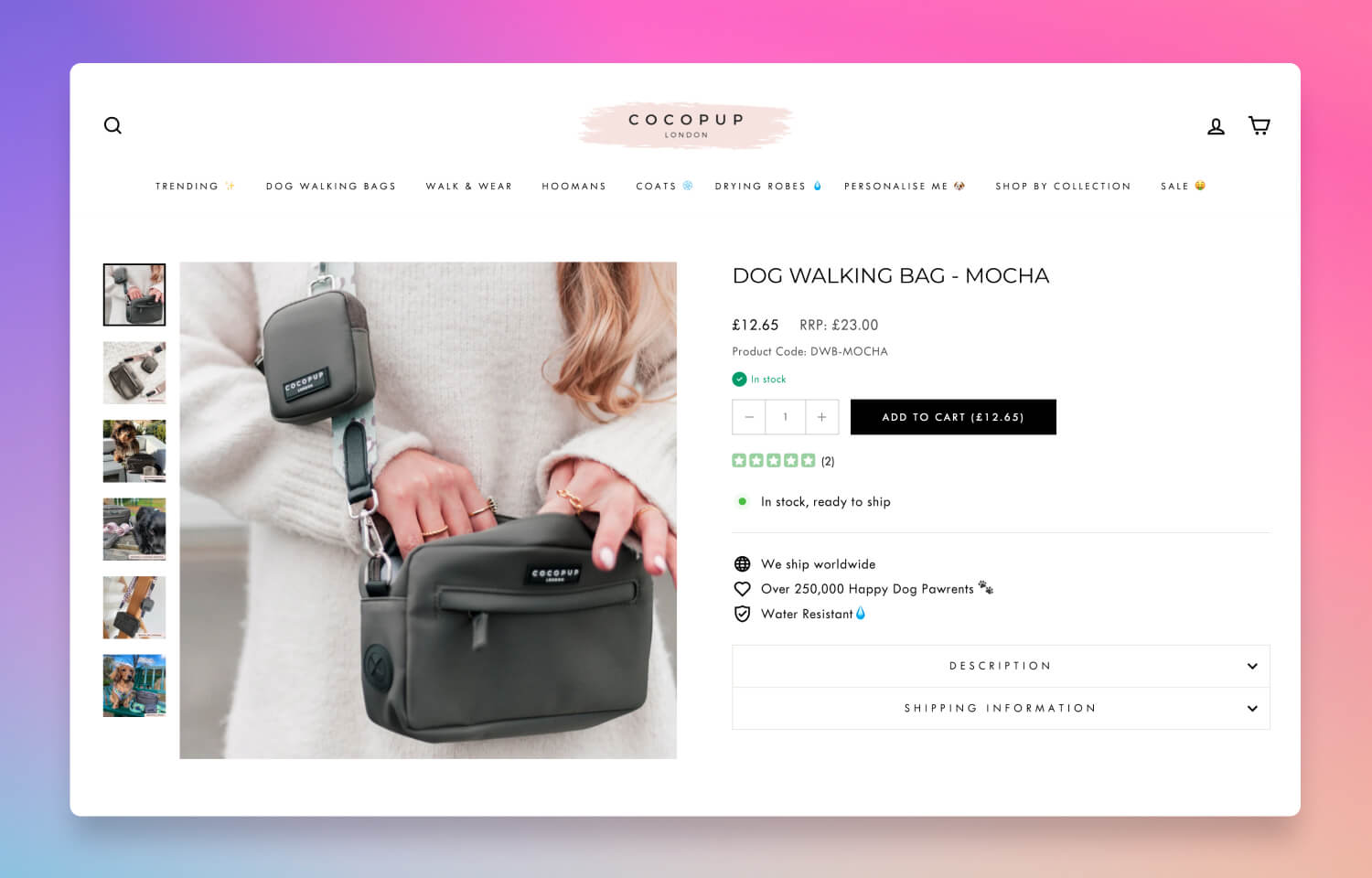 A more simple approach on Cocopup London
These distinctions, like live stock levels, SKU visibility, and quantity controls, are examples of how B2B PDPs prioritise functionality and efficiency over the more narrative, brand-focused approach typical in B2C.
However, not all PDPs are created equal!
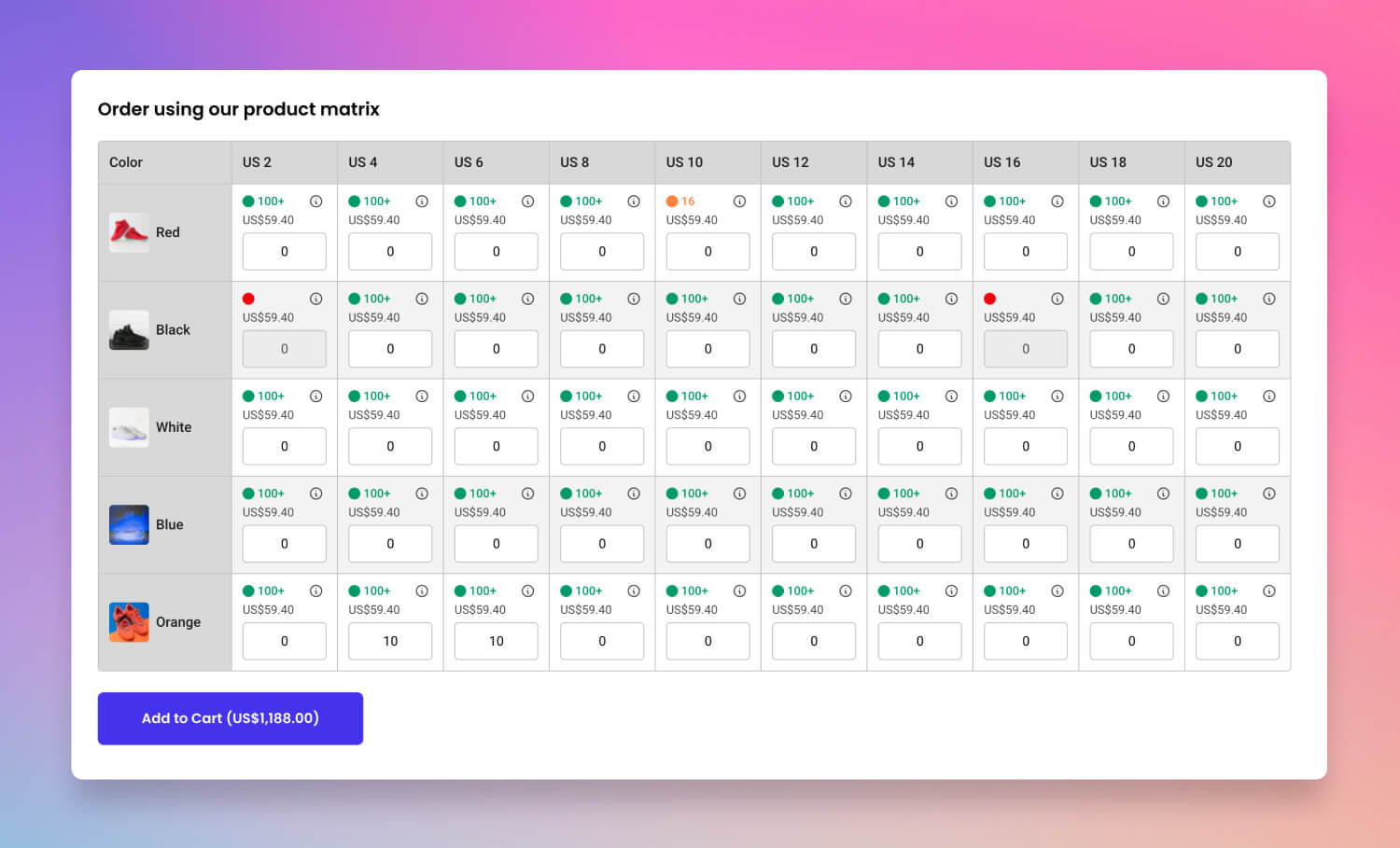 The matrix view - the ultimate B2B interface!
This PDP features a powerful tool called a 'matrix view', a layout that enables B2B customers to add multiple product variants to their cart simultaneously. Unlike typical dropdown selectors that require users to select each variant one by one, the matrix view displays all variants, such as different sizes, colours, or pack sizes, in a single, organised table.
Each variant is presented as a row or column, with quantity fields that allow customers to enter desired quantities for each option at once. This design streamlines bulk ordering, saving valuable time and effort, particularly for buyers who frequently purchase across multiple SKUs. By offering a clear, consolidated view of all options, the matrix table empowers B2B buyers to manage large orders with accuracy and efficiency, all within the same page.
For example, a wholesale buyer ordering apparel might see each colour and size combination listed in the matrix, enabling them to input the quantities of each without navigating away from the product page. This approach simplifies the experience, making it faster for B2B customers to review and order all required variants and enhancing the user experience on a high-functionality PDP.
The B2B checklist
To help clarify these differences, here's a checklist highlighting essential elements for both B2C and B2B PDPs:
| Feature | B2C | B2B | Notes |
|---|---|---|---|
| High-quality product imagery | ✓ | ✓ | Vital for product evaluation in both contexts |
| Detailed product specifications | ✓ | ✓ | Supports informed decision-making |
| Add-to-cart button | ✓ | ✓ | Streamlines purchasing in both settings |
| Wishlist option | ✓ | Common in B2C; less relevant in B2B | |
| Customer reviews | ✓ | Primarily a B2C feature for social proof | |
| Displaying SKU | ✓ | Essential for B2B inventory management | |
| Displaying barcode | ✓ | Provides standardised codes essential for inventory and logistics | |
| Live inventory count | ✓ | Helps B2B customers plan their order volumes | |
| Bulk-order quantity options | ✓ | Facilitates high-volume ordering for B2B buyers | |
| Displaying RRP | ✓ | Useful for B2B customers setting their own resale prices | |
| Product variants in matrix view | ✓ | Enables fast ordering across multiple SKUs or product types | |
| Quantity rules (e.g., pack sizing, minimum quantities) | ✓ | Sets required order minimums and increments for B2B orders | |
| Quantity pricing rules (i.e., quantity savings) | ✓ | Adjusts unit prices based on order volume | |
| Unit cost pricing | ✓ | Displays pricing per unit, supporting bulk purchasing transparency | |
| Tax settings (e.g., excluding tax price) | ✓ | Shows tax-exclusive pricing tailored for B2B tax considerations | |
| Preordering and backordering | ✓ | Allows B2B customers to reserve or order out-of-stock items |
B2B eCommerce website best practices
Good B2B product pages are one part of a broader B2B UI and UX strategy. Here are the practices that make the biggest difference across the full buyer journey.
Show pricing at login
B2B buyers expect to see their prices the moment they sign in. Requiring them to contact your team for a quote before they can see pricing creates friction at the most critical point in the buying process. Account-specific pricing should display automatically on every product page and in the cart as soon as a trade buyer logs in, at a customer level. SparkLayer's Discount Engine applies the right price list to the right buyer automatically, including volume breaks and promotional rates. SparkLayer's Customer Group settings also show the right pricing, net terms, shipping methods, and payment options for each type of customer.
Separate wholesale from retail without a separate store
One of the most common B2B website mistakes is maintaining two separate stores, one for retail and one for wholesale. This creates double the maintenance overhead and a disjointed experience for buyers who purchase from both channels. The better approach is a single store with access rules that show the right experience to the right buyer. SparkLayer's B2B Catalogs controls product visibility by customer group, so retail shoppers and trade buyers see exactly what they are supposed to see from one storefront.
Design for repeat ordering
B2B buyers are not browsing. They are restocking. A well-designed B2B eCommerce website makes it as fast as possible to place the same order again. That means order history accessible from the account area, one-click reordering from previous purchases, and shopping lists that save recurring baskets. These features reduce the time a buyer spends on your site per order, which is exactly what a trade buyer wants.
Give sales reps the same portal as buyers
The best B2B websites remove the gap between what buyers see and what sales reps see. When a sales rep has to work from a separate admin backend to place or adjust an order, mistakes happen and the experience slows down. SparkLayer's Sales Agent Ordering lets sales reps log in as any buyer account and work from the same storefront the buyer uses, with live account-specific pricing and order tools built in.
Make the checkout B2B-native
A checkout built for retail is the wrong end for a wholesale order. B2B checkouts need to support net payment terms, payment on account, purchase order numbers, and B2B-specific shipping rules. These are not optional extras for trade buyers. They are standard expectations. Bolting them onto a retail checkout as an afterthought creates a poor experience that undermines the rest of the site.
Ready to build a better B2B product page and UI/UX experience?
By examining the PDP across B2C and B2B contexts, we see a few shared elements, such as quality images and detailed product descriptions, that form the core of a strong user experience. B2B PDPs take this a step further by incorporating features like stock visibility, SKU display, and bulk-order options, addressing the unique needs of business customers.
Whether you are enhancing a B2C PDP for a B2B audience or building a B2B eCommerce platform from the ground up, these distinctions are crucial to delivering an effective user experience. If you would like to discuss how to tailor your existing store for B2B customers, book a demo with our team.