
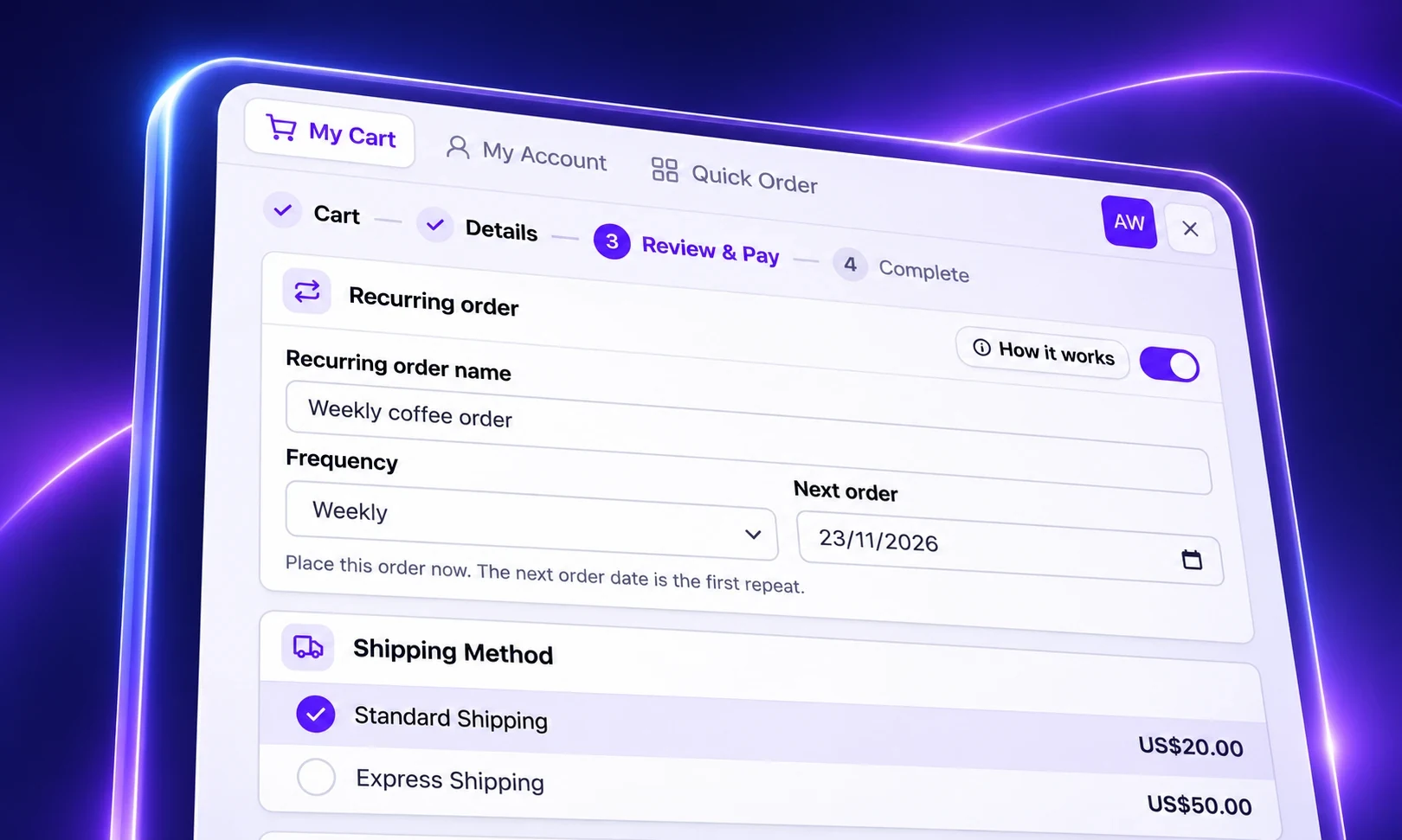
Recurring orders are live in SparkLayer today. Your wholesale customers can now set an order to repeat weekly, every 2 weeks or monthly, and SparkLayer places each one for them, at their own prices, after they've had the chance to check it.
Most of your best customers already order on a rhythm. A café restocks the same coffee every Monday. A salon tops up its retail range at the start of each month. Until now, each of those orders had to be rebuilt from scratch, or remembered, and the ones that slipped through the cracks were usually from regulars who simply forgot to reorder. Recurring orders take that job off their hands, and give you orders you can plan around.
Recurring orders are part of SparkLayer 5, our major upgrade to the B2B experience your customers and sales team use every day.
At a glance
- Set up at checkout: customers turn on Recurring order on the last step and choose how often it repeats.
- Checked before it's placed: each repeat is scheduled a few days ahead, and your customer is emailed to review it.
- Their prices, their payment method: nothing is charged in the background.
- Theirs to manage: edit, place early, pause or delete from My Account.
- Available now on the Growth, Pro and Enterprise plans.
Subscriptions, designed for wholesale
You might know this as subscriptions, and it does the same job. The difference is that it's designed around how wholesale actually works.
A consumer subscription charges a card on file and sends the box. A trade customer needs more say than that. Their order might change with the season, their prices are agreed with you, and many of them pay on account or by invoice. So every recurring order in SparkLayer is a real order in your customer's account: they see it coming, they can change it, and it goes through the same checkout and payment terms as any other order they place with you.
How it works
1. Your customer sets it up at checkout
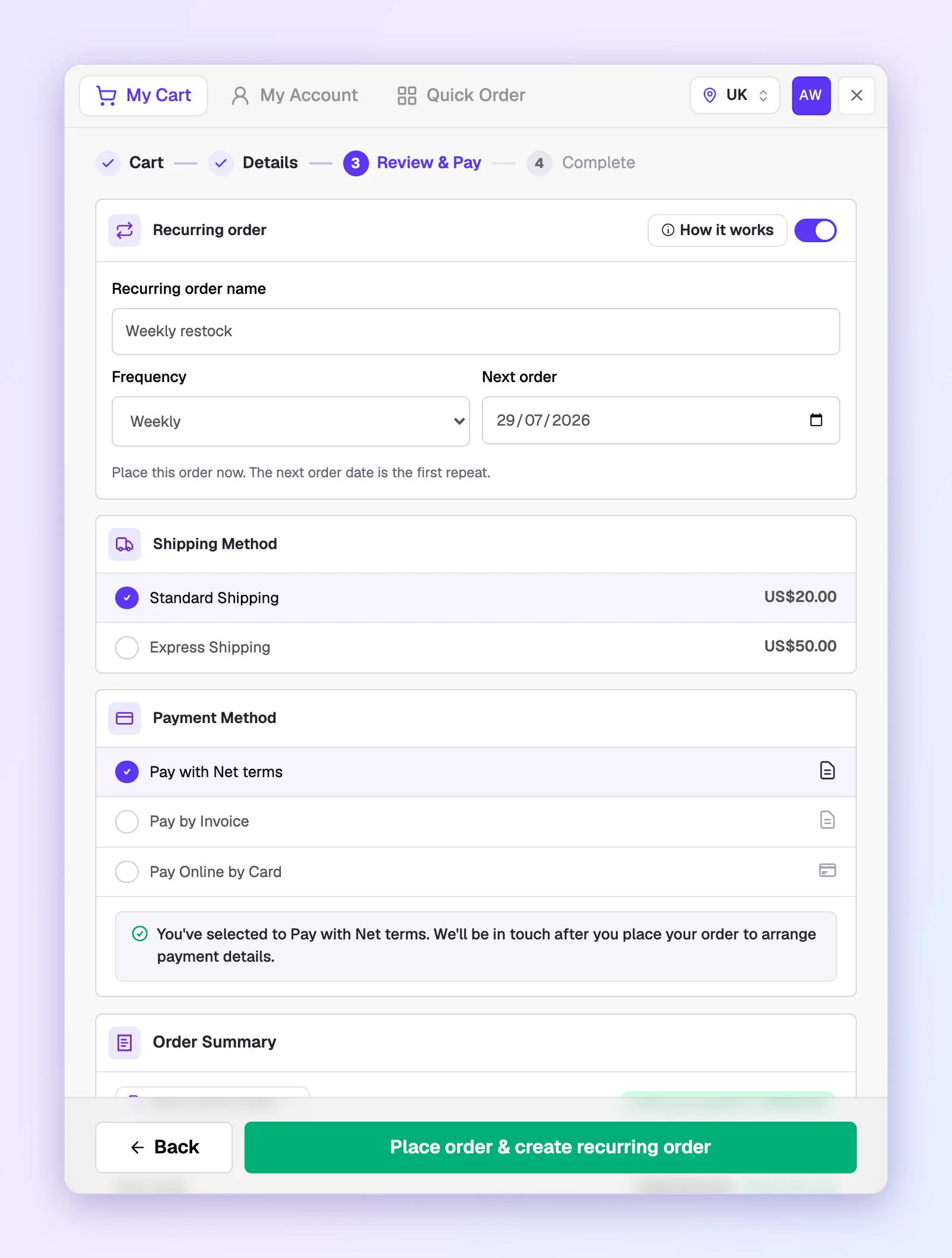
There's no separate subscriptions portal to learn. On the last step of the checkout, Review & Pay, your customer turns on Recurring order, gives it a name and chooses how often it repeats. Today's order is placed as normal, and the next order date becomes the first repeat.
2. Every repeat is scheduled ahead
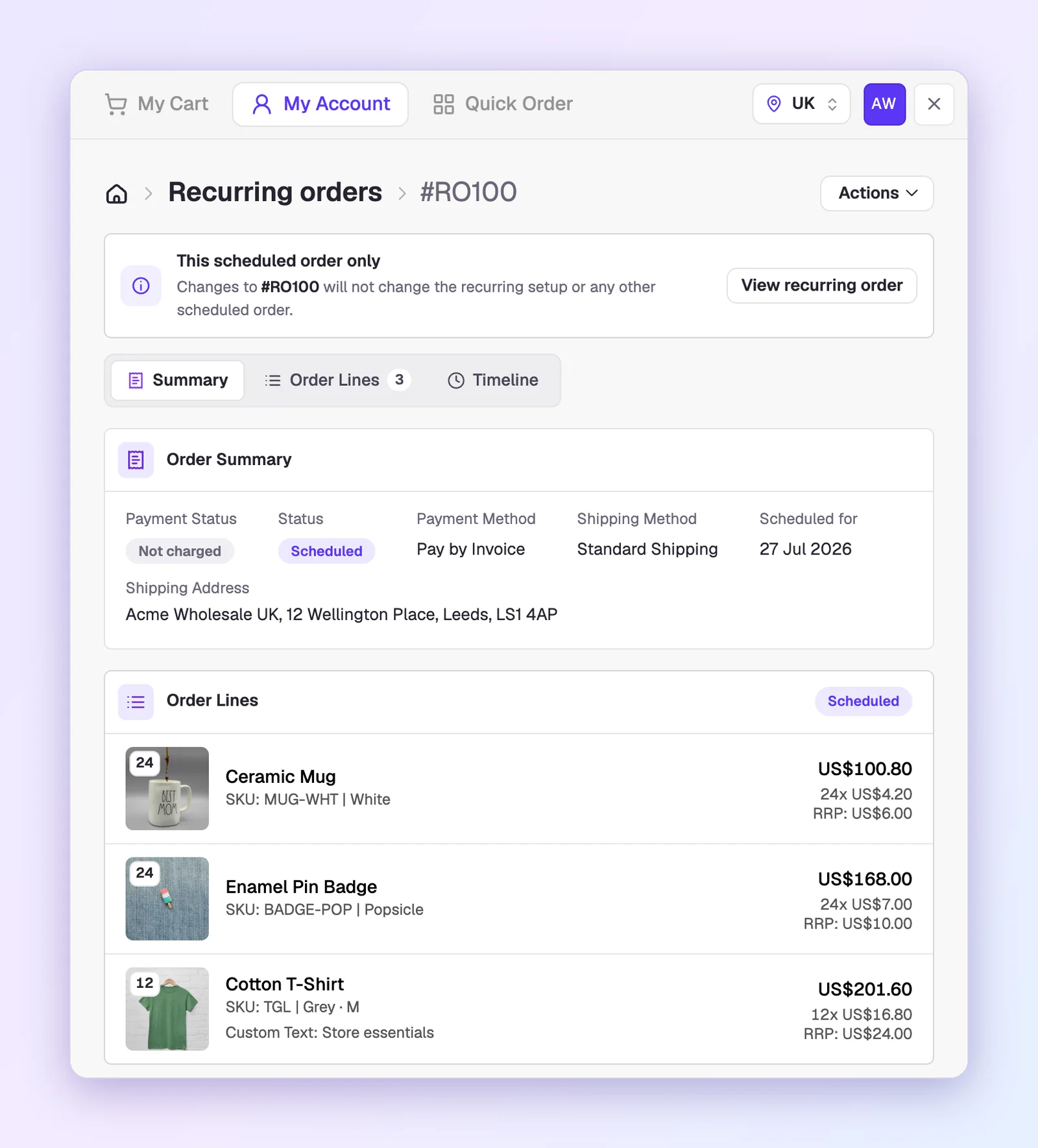
A few days before each date, SparkLayer creates the next order in your customer's account as a scheduled order, at their current prices, and emails them to review it. You decide how much notice they get, anywhere from 3 to 7 days.
Nothing is placed until its date. In the meantime, your customer can open the scheduled order to change just that one delivery, or place it early, and the recurring setup stays exactly as it is.
3. It's theirs to manage in My Account
Every recurring order has its own page in My Account, showing what's on it, how often it repeats and when the next order is due. From there, your customer can edit it in the cart they already know, with their prices, pack sizes and minimums applied, and the change carries through to every future order. They can also pause it while they're closed for the summer, or delete it and choose whether any orders already scheduled are kept or cancelled.
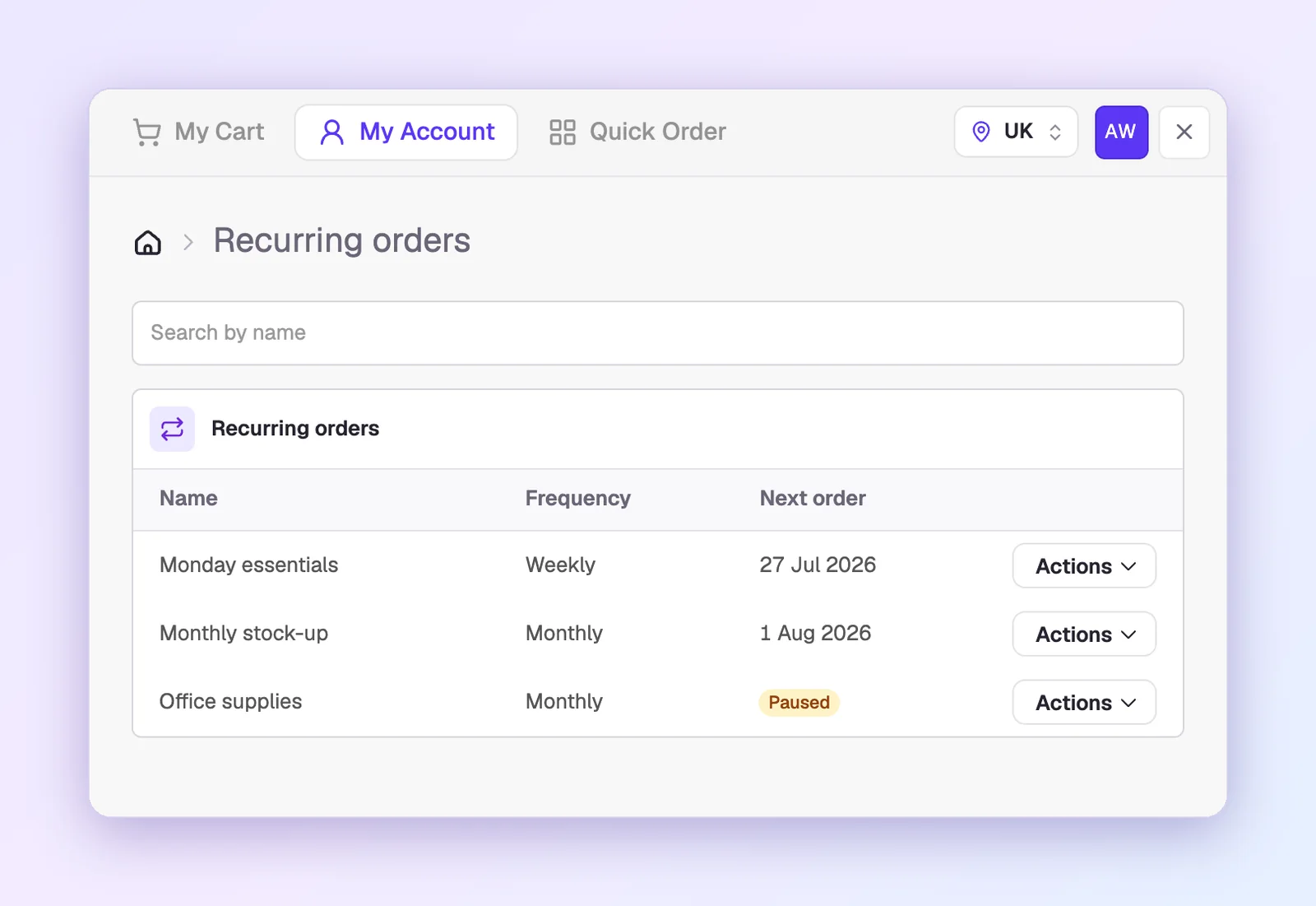
Your customers make those changes themselves, so they never need to email your team to update a regular order.
4. It's placed on the day
On its date, the scheduled order is placed as a normal order in your store, on the payment method your customer chose. Their customer pricing and your cart rules apply, just as they would on any other order. If an order can't be placed, perhaps because a product is no longer available, your customer is emailed so they can fix it.
Why it matters for your wholesale business
| What your customers get | What you get |
|---|---|
| Their regular order, placed without having to remember it | Fewer missed reorders from your best accounts |
| A chance to check every order before it goes out | Orders that arrive right first time, with less back and forth |
| Their own prices and payment terms on every order | No card charged in the background, and no separate system to reconcile |
| Control over every change, from My Account | Regular orders you can plan stock and staffing around |
Your sales reps can set them up too
When your sales reps order on a customer's behalf, they can make that order recurring in exactly the same way. It's a natural next step after a good conversation: agree the regular order once, set it to repeat, and let it run.
Turning it on
Recurring orders take a couple of minutes to set up in your SparkLayer Dashboard:
- Check your plan. Recurring orders are included on Growth, Pro and Enterprise.
- Switch them on. Go to Settings › Configurations › Ordering and turn on Recurring orders.
- Choose the review window. Pick how many days customers get to check each order before it's placed, from 3 to 7.
- Decide who can use them. Recurring orders are on for every customer group, unless you turn them off for one.
Then let your regular customers know. They'll see Recurring order on the last step of the checkout, and their recurring orders in My Account. Our setup guide walks you through each step, and there's a guide for your customers on managing them too.
Frequently asked questions
Are recurring orders the same as B2B subscriptions?
They do the same job. Your customer sets an order to repeat, and SparkLayer places each one for them. The difference is that every repeat is a real order in their account, scheduled ahead for them to review, at their own prices and on their usual payment method.
How often can an order repeat?
Weekly, every 2 weeks or monthly. Your customer chooses when they set it up, and can change it later from My Account.
Are customers charged automatically?
No. Each order is placed on the payment method your customer chose, so it goes through on account or by invoice as usual. Customers who pay by card are emailed a link to pay, and the order is placed once they do.
Can customers pause or change a recurring order?
Yes. From My Account they can edit a recurring order, change a single scheduled order, place one early, pause the whole thing until they resume it, or delete it.
Which plans include recurring orders?
Growth, Pro and Enterprise. If you're on Basic or Starter, you can compare plans or email support@sparklayer.io and we'll help.
Available now
Recurring orders are live today for SparkLayer merchants on Growth, Pro and Enterprise, as the latest addition to SparkLayer 5. If you missed it, our SparkLayer 5 launch post covers everything else that's new. Many of you have asked us for this, and I'm excited to see how your customers put it to work. If you'd like a hand getting set up, our team is here to help at support@sparklayer.io.
You can also see how recurring orders work in more detail, or try them on your own store with Ask Sparkie.